cgroup v2
概况
cgroup是一个目录树,每层目录下都可以创建子目录,子目录默认继承父目录的属性,具有层级结构。
cgroup把一个cgroup目录中的资源划分给它的子目录,子目录可以把资源继续划分给它的子目录,子目录分配的资源之和不能超过父目录,进程或者线程可以使用的资源受到它们委身的目录中的资源的限制。
cgroup v2和cgroup v1区别很大,这一点可以反映在目录结构下,
1
2
3
4
5
6
7
8
9
10
11
12
13
14
15
16
17
18
19
20
21
22
23
24
25
26
27
28
29
30
31
32
33
ll /sys/fs/cgroup
total 0
  1 0 dr-xr-xr-x 12 root root 0 11月 24 09:34 .
  2 0 drwxr-xr-x  7 root root 0 11月 24 09:09 ..
  4 0 -r--r--r--  1 root root 0 11月 24 09:09 cgroup.controllers
  7 0 -rw-r--r--  1 root root 0 11月 24 09:25 cgroup.max.depth
  6 0 -rw-r--r--  1 root root 0 11月 24 09:25 cgroup.max.descendants
  2 0 -rw-r--r--  1 root root 0 11月 24 09:09 cgroup.procs
  8 0 -r--r--r--  1 root root 0 11月 24 09:25 cgroup.stat
  5 0 -rw-r--r--  1 root root 0 11月 24 09:09 cgroup.subtree_control
  3 0 -rw-r--r--  1 root root 0 11月 24 09:25 cgroup.threads
 12 0 -rw-r--r--  1 root root 0 11月 24 09:25 cpu.pressure
 13 0 -r--r--r--  1 root root 0 11月 24 09:25 cpuset.cpus.effective
 14 0 -r--r--r--  1 root root 0 11月 24 09:25 cpuset.mems.effective
  9 0 -r--r--r--  1 root root 0 11月 24 09:25 cpu.stat
213 0 drwxr-xr-x  2 root root 0 11月 24 09:09 dev-hugepages.mount
245 0 drwxr-xr-x  2 root root 0 11月 24 09:09 dev-mqueue.mount
 21 0 drwxr-xr-x  2 root root 0 11月 24 09:09 init.scope
 20 0 -rw-r--r--  1 root root 0 11月 24 09:25 io.cost.model
 19 0 -rw-r--r--  1 root root 0 11月 24 09:25 io.cost.qos
 10 0 -rw-r--r--  1 root root 0 11月 24 09:25 io.pressure
 15 0 -r--r--r--  1 root root 0 11月 24 09:25 io.stat
 17 0 -r--r--r--  1 root root 0 11月 24 09:25 memory.numa_stat
 11 0 -rw-r--r--  1 root root 0 11月 24 09:25 memory.pressure
 16 0 -r--r--r--  1 root root 0 11月 24 09:25 memory.stat
 18 0 -r--r--r--  1 root root 0 11月 24 09:25 misc.capacity
725 0 drwxr-xr-x  2 root root 0 11月 24 09:09 proc-sys-fs-binfmt_misc.mount
661 0 drwxr-xr-x  2 root root 0 11月 24 09:09 sys-fs-fuse-connections.mount
693 0 drwxr-xr-x  2 root root 0 11月 24 09:09 sys-kernel-config.mount
277 0 drwxr-xr-x  2 root root 0 11月 24 09:09 sys-kernel-debug.mount
309 0 drwxr-xr-x  2 root root 0 11月 24 09:09 sys-kernel-tracing.mount
 53 0 drwxr-xr-x 25 root root 0 11月 24 09:38 system.slice
181 0 drwxr-xr-x  3 root root 0 11月 24 09:11 user.slice
目录下的文件用来设置控制器,这些文件被称作cgroup控制器的文件接口。其中,cgroup.controllers中存放了支持的cgroup Controller类型,
1
2
cat /sys/fs/cgroup/cgroup.controllers
cpuset cpu io memory hugetlb pids rdma misc
controller默认是为开启的。通过向cgroup.subtree_control文件写数据,来子目录可用的资源控制器。
1
2
cat /sys/fs/cgroup/cgroup.subtree_control
memory pids
这说明子目录的内存控制器、pids控制器是开启的。
开启cpu控制器(以root用户操作),
1
2
3
echo '+cpu' > /sys/fs/cgroup/cgroup.subtree_control
cat /sys/fs/cgroup/cgroup.subtree_control
cpu memory pids
关闭cpu控制器,
1
2
3
echo '-cpu' > /sys/fs/cgroup/cgroup.subtree_control
cat /sys/fs/cgroup/cgroup.subtree_control
memory pids
Only controllers which are listed in “cgroup.controllers” can be enabled. When multiple operations are specified as above, either they all succeed or fail. If multiple operations on the same controller are specified, the last one is effective.
子目录的cgroup.controllers受限于父目录的cgroup.subtree_control。
例如父目录开启了cpu、memory、pids,则子目录仅能开启cpu、memory、pids。
1
2
3
mkdir /sys/fs/cgroup/A                                                               cat /sys/fs/cgroup/A/cgroup.controllers                                             cpu memory pids
cat /sys/fs/cgroup/A/cgroup.subtree_control                                         mkdir /sys/fs/cgroup/A/B
cat /sys/fs/cgroup/A/B/cgroup.controllers                                           echo '+cpu' > /sys/fs/cgroup/A/cgroup.subtree_control                               cat /sys/fs/cgroup/A/B/cgroup.controllers                                           cpu
1
2
3
4
5
6
7
8
9
10
11
12
13
14
15
echo '(A:[ACtrl]{label:"controllers:cpu memory pids"}[ASubCtrl]{label:"subtree control:cpu"}) (B:[BCtrl]{label:"controllers:cpu"}[BSubCtrl]{label:"subtree control:"}) [ASubCtrl]->[ACtrl] [BCtrl]->[ASubCtrl] {flow:south}' | graph-easy
+ - - - - - - - - - - -+     +- - - - - - - - - - - - - - - - -+
' B:                   '     ' A:                              '
'                      '     '                                 '
' +------------------+ '     ' +-----------------------------+ '
' | controllers:cpu  | ' --> ' |     subtree control:cpu     | '
' +------------------+ '     ' +-----------------------------+ '
'                      '     '   |                             '
'                      '     '   |                             '
'                      '     '   v                             '
' +------------------+ '     ' +-----------------------------+ '
' | subtree control: | '     ' | controllers:cpu memory pids | '
' +------------------+ '     ' +-----------------------------+ '
'                      '     '                                 '
+ - - - - - - - - - - -+     +- - - - - - - - - - - - - - - - -+
挂载cgroup Controller
1
2
mkdir mnt_cgroup
sudo mount -t cgroup2 cgroup2 ./mnt_cgroup
在mnt_cgroup目录下,可以看到类似与/sys/fs/cgroup结构。
控制器目录结构
在cgroup v2中,进程只能加入到叶子目录节点(*除cgroup根节点外)。
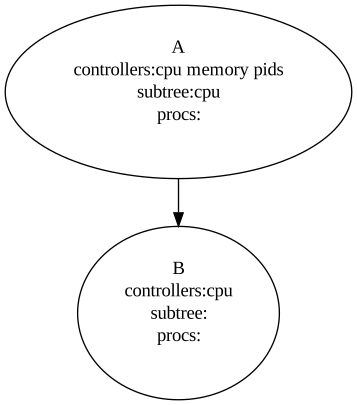
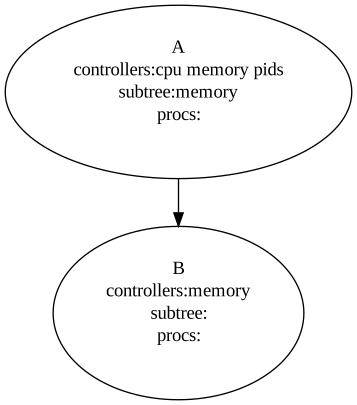
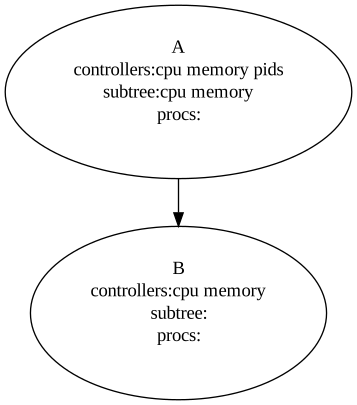
然而,CPU控制器和内存控制器判定子目录的方法稍有区别。
在图1中,A、B目录均没有追加任何进程(初始状态)。受CPU控制器影响,
- 如果B目录追加了进程,那么B目录将成为子目录,那么A目录将无法追加任何进程。
- 如果A目录先追加进程,那么A目录将成为子目录,那么B目录将废弃,无法追加任何进程。
在图2中,A、B目录均没有追加任何进程(初始状态)。受内存控制器影响,
- B目录为子目录,A目录不能追加任何进程。
在图3中,A、B目录均没有追加任何进程(初始状态)。虽然,B目录同时支持CPU控制器、内存控制器,但是B目录会默认成为子目录。A、B并不会根据追加进程先后判断子目录,因为受内存控制器作用,A目录是无法追加任何进程。
本质上,一个cgroup目录如果绑定了进程,那么它的cgroup.subtree_control必须为空,或者反过来必须不绑定进程,cgroup.subtree_control中才可以有内容。
More precisely, the rule is that a (nonroot) cgroup can’t both (1) have member processes, and (2) distribute resources into child cgroups—that is, have a nonempty cgroup.subtree_control file.
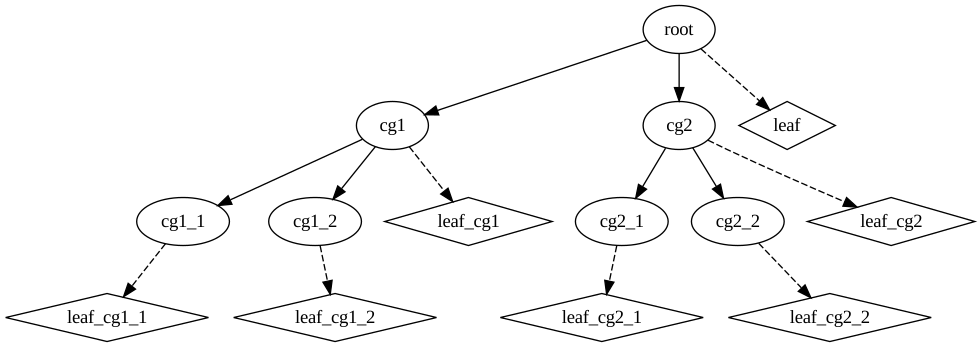
如果,中间目录的控制器规则满足某个进程的需要,那么应该如何处理呢?
参考图4,假如cg1满足进程的需要,可以在cg1建立一个叶子子目录leaf_cg1,该目录下的控制其规则默认继承自cg1,可以将进程绑定在leaf_cg1上。
进程控制器和线程控制器
从Linux kernel 4.14开始,cgroup v2 引入了thread mode(线程模式),controller被分为domain controller(cgroup进程控制器)和threaded controller(cgroup线程控制器)。
cgroup目录有了类型之分:只管理进程的cgroup目录是domain cgroup,称为进程(子)目录;新增的管理线程的cgroup目录是threaded cgroup,称为线程子目录。
cgroup控制器core接口文件
cgroup.type
当前cgroup的类型,cgroup类型包括:
- domain:默认类型。
- domain threaded:作为threaded类型cgroup的根结点。
- domain invalid:无效状态cgroup。
- threaded:threaded类型的cgroup组。
cgroup.procs
该文件是当前cgroup的PID列表,向该文件echo $pid,可以使$pid加入组。
一个pid可以从一个组迁移到另一个组,但要满足以下两项条件,
- 进程对新组有写访问权限。
- 源组和目的组拥有共同的祖先。
cgroup.threads
该文件是当前cgroup的TID列表,可以控制组内线程。
cgroup.controllers
该文件是当前组支持的控制器类型列表。
cgroup.subtree_control
该文件是子目录组开启的控制器类型列表。
cgroup.events
该文件包含两个只读的key-value。
populated:1表示当前cgroup内有进程,0表示没有。frozen:1表示当前cgroup为frozen状态,0表示非此状态。
cgroup.max.descendants
当前cgroup目录中可以允许的最大子cgroup个数。默认值为max。
If the actual number of descendants is equal or larger, an attempt to create a new cgroup in the hierarchy will fail.
子组数量超过该值,该目录下创建新的组会失败。
cgroup.max.depth
当前cgroup目录中可以允许的最大cgroup层级数。默认值为max。
If the actual descent depth is equal or larger, an attempt to create a new child cgroup will fail.
cgroup.stat
包含两个只读的key-value。
nr_descendants:当前cgroup下可见的子孙cgroup个数。nr_dying_descendants:这个cgroup下曾被创建但是已被删除的子孙cgroup个数。
cgroup.freeze
值为1可以将组置为freeze状态。默认值为0。
cgroup.kill
A write-only single value file which exists in non-root cgroups. The only allowed value is “1”.
Writing “1” to the file causes the cgroup and all descendant cgroups to be killed. This means that all processes located in the affected cgroup tree will be killed via SIGKILL.
只写单值文件,向该文件写1可以杀死该组和该组的子组。
CPU控制器
可压缩资源
CPU接口文件
cpu.stat
当前cgroup的CPU消耗统计。该文件的存在意味着CPU控制器是否开启。显示的内容包括:
usage_usec:占用CPU总时间。user_usec:用户态占用时间。system_usec:内核态占用时间。nr_periods:周期计数。nr_throttled:周期内的限制计数。throttled_usec:限制执行的时间。
cpu.weight
可以通过cpu.weight文件来设置本cgroup的权重值。默认为100。取值范围为[1,10000]。
cpu.weight.nice
该接口文件是cpu.weight的替代接口,允许使用 nice 使用的相同值读取和设置权重。 因为对于 nice 值(CPU调度优先级),范围更小且粒度更粗,所以读取值是当前权重的最接近的近似值。
cpu.max
带宽最大限制,默认max 100000。
文件遵循如下格式
1
$MAX $PERIOD
表示在$PERIOD周期内,该组可以消耗最多$MAX周期。
cpu.max.burst
默认值0,取值范围为[0,$MAX]。
CPU低于配额时,burst累积;当CPU使用超出配额时,根据burst累积量,允许CPU短时超额使用。
cpu.pressure
显示当前cgroup的CPU使用压力状态。
cpu.uclamp.min
默认值0。
uclamp提供了一种用户空间对于task util进行限制的机制。
cpu.uclamp.max
默认值max。
CPU配额实例
创建控制组A,CPU配额50%的CPU核。
1
2
3
mkdir /sys/fs/cgroup/A
echo '+cpu' > /sys/fs/cgroup/cgroup.subtree_control
echo '50000 100000' > /sys/fs/cgroup/A/cpu.max
空转任务如下:
1
2
3
4
5
6
7
echo $$
while :
do
	:
done
./loop.sh
11762
空转任务CPU使用率为100%,
1
2
3
4
5
6
top -p 11762

...

   PID USER      PR  NI    VIRT    RES    SHR S  %CPU  %MEM     TIME+ COMMAND
  11762 cheney    20   0   10336   3132   2800 R 100.0   0.0   0:25.89 loop.sh
为进程11762分配控制组A,
1
echo '11762' > /sys/fs/cgroup/A/cgroup.procs
再次查看CPU使用率为50%。
1
2
3
4
5
6
top -p 11762

...

    PID USER      PR  NI    VIRT    RES    SHR S  %CPU  %MEM     TIME+ COMMAND
  11762 cheney    20   0   10336   3184   2848 R  50.0   0.0   1:15.85 loop.sh
内存控制器
不可压缩资源
内存接口文件
All memory amounts are in bytes. If a value which is not aligned to PAGE_SIZE is written, the value may be rounded up to the closest PAGE_SIZE multiple when read back.
内存量按照内存页大小向上对齐。
memory.max
默认值为max,不限制。如果需要做限制,则写一个内存字节数上限到文件内就可以了。cgroup的内存使用量超过该阈值,会触发OOM。
memory.min
这是内存的硬保护机制。如果当前cgroup的内存使用量在min值以内,则任何情况下都不会对这部分内存进行回收。如果没有可用的不受保护的可回收内存,则将oom。这个值会受到上层cgroup的min限制影响,如果所有子一级的min限制总数大于上一级cgroup的min限制,当这些子一级cgroup都要使用申请内存的时候,其总量不能超过上一级cgroup的min。这种情况下,各个cgroup的受保护内存按照min值的比率分配。如果将min值设置的比你当前可用内存还大,可能将导致持续不断的oom。如果cgroup中没有进程,这个值将被忽略。
memory.high
内存使用的预警值,当内存使用量超出该值,并不会出发OOM。而是,内核会尽量回收该cgroup下的内存,使内存使用量尽量回落在该值之下。
memory.low
内存使用下限限制,当内存使用量低于该值时,内核会尽量不回收该cgroup下的内存。
memory.high和memory.low目的是用于控制内存回收的优先级。
(其余有待补充)
内存配额实例
创建控制组A,内存配额512MB。
1
2
3
echo '+memory' > /sys/fs/cgroup/cgroup.subtree_control
mkdir /sys/fs/cgroup/A/
echo '536870912' > /sys/fs/cgroup/A/memory.max
使用memtester申请内存,
1
2
3
4
5
6
7
8
9
10
11
12
13
14
15
16
17
18
19
20
21
22
23
24
25
26
27
28
29
30
sudo memtester 1G 1
memtester version 4.5.1 (64-bit)
Copyright (C) 2001-2020 Charles Cazabon.
Licensed under the GNU General Public License version 2 (only).

pagesize is 4096
pagesizemask is 0xfffffffffffff000
want 1024MB (1073741824 bytes)
got  1024MB (1073741824 bytes), trying mlock ...locked.
Loop 1/1:
  Stuck Address       : ok
  Random Value        : ok
  Compare XOR         : ok
  Compare SUB         : ok
  Compare MUL         : ok
  Compare DIV         : ok
  Compare OR          : ok
  Compare AND         : ok
  Sequential Increment: ok
  Solid Bits          : ok
  Block Sequential    : ok
  Checkerboard        : ok
  Bit Spread          : ok
  Bit Flip            : ok
  Walking Ones        : ok
  Walking Zeroes      : ok
  8-bit Writes        : ok
  16-bit Writes       : ok

Done.
说明进程可以申请到1GB内存。
打开新的shell,查看PID,
1
2
echo $$
11110
将该进程加入到用户组A,然后测试内存申请。
1
echo '11110' > /sys/fs/cgroup/A/cgroup.procs
在PID:11110的shell中执行内存测试,
1
2
3
4
5
6
7
8
9
sudo memtester 1G 1
memtester version 4.5.1 (64-bit)
Copyright (C) 2001-2020 Charles Cazabon.
Licensed under the GNU General Public License version 2 (only).

pagesize is 4096
pagesizemask is 0xfffffffffffff000
want 1024MB (1073741824 bytes)
got  1024MB (1073741824 bytes), trying mlock ...[1]    8270 killed     sudo memtester 1G 1
IO控制器
IO接口文件
io.max
限制读写最大速率,如下配额中包括5部分,分别为设备编号($MAJ:$MIN)、读速率rbps(每秒可读字节数)、写速率wbps(每秒可写字节数)、读请求速率riops(每秒读请求的数量)、写请求速率wiops(每秒写请求的数量)。如下规则可以解释为“设备8:0将写速率限制在2MB/s内”。
1
8:0 rbps=max wbps=2097152 riops=max wiops=max
io.latency
这是cgroup v2实现的一种对io负载保护的机制。可以给一个磁盘设置一个预期延时目标。
1
8:0 target=100
如上规则可以解释为“设备8:0将延时预期限制在了100ms内”。
如果cgroup检测到当前cgroup内的io响应延迟时间超过了这个target,那么cgroup可能会限制同一个父级cgroup下的其他同级别cgroup的io负载,以尽量让当前cgroup的target达到预期。
IO配额实例
io.max
查看本地设备,
1
2
3
4
5
6
7
8
9
10
11
12
13
14
sudo fdisk -l
[sudo] password for cheney:
Disk /dev/sda: 931.51 GiB, 1000204886016 bytes, 1953525168 sectors
Disk model: HGST HTS541010A9
Units: sectors of 1 * 512 = 512 bytes
Sector size (logical/physical): 512 bytes / 4096 bytes
I/O size (minimum/optimal): 4096 bytes / 4096 bytes
Disklabel type: gpt
Disk identifier: 7855E321-8FE0-364B-8FF4-A8786BD52E33

Device          Start        End    Sectors   Size Type
/dev/sda1        4096     618495     614400   300M EFI System
/dev/sda2      618496 1926796144 1926177649 918.5G Linux filesystem
/dev/sda3  1926796145 1953520064   26723920  12.7G Linux swap
查看设备/dev/sda的编号,
1
2
stat -c %t:%T /dev/sda
8:0
创建新的cgroup并开启IO控制器,
1
2
3
echo '+io' > ./cgroup.subtree_control
mkdir ./A
echo '8:0 wbps=2097152' > ./A/io.max
在新的shell中测试速率,
1
2
3
4
5
6
7
8
9
10
dd if=/dev/zero of=~/testfile bs=1M count=200 oflag=direct
200+0 records in
200+0 records out
209715200 bytes (210 MB, 200 MiB) copied, 2.25754 s, 92.9 MB/s

echo $$ > /sys/fs/cgroup/A/cgroup.procs
dd if=/dev/zero of=~/testfile bs=1M count=200 oflag=direct
200+0 records in
200+0 records out
209715200 bytes (210 MB, 200 MiB) copied, 100.019 s, 2.1 MB/s
进入cgroup A后,IO速率被限制在了2MB/s。
io.latency
fio工具可以测试IO延时,
1
2
3
4
5
6
7
8
9
10
11
12
13
14
15
16
17
18
19
20
21
22
23
24
25
26
27
28
29
30
 fio -filename=testfile -direct=1 -iodepth 1 -thread -rw=write -ioengine=sync -bs=1M -size=2000M -numjobs=1 -group_reporting -name=sqe_2000_1M
sqe_2000_1M: (g=0): rw=write, bs=(R) 1024KiB-1024KiB, (W) 1024KiB-1024KiB, (T) 1024KiB-1024KiB, ioengine=sync, iodepth=1
fio-3.28
Starting 1 thread
Jobs: 1 (f=1): [W(1)][100.0%][w=94.0MiB/s][w=94 IOPS][eta 00m:00s]
sqe_2000_1M: (groupid=0, jobs=1): err= 0: pid=9403: Fri Nov 26 11:02:27 2021
  write: IOPS=94, BW=94.5MiB/s (99.0MB/s)(2000MiB/21174msec); 0 zone resets
    clat (usec): min=2362, max=98388, avg=10515.88, stdev=3383.55
     lat (usec): min=2397, max=98449, avg=10573.54, stdev=3384.18
    clat percentiles (usec):
     |  1.00th=[ 8356],  5.00th=[ 8586], 10.00th=[ 8586], 20.00th=[10159],
     | 30.00th=[10290], 40.00th=[10421], 50.00th=[10421], 60.00th=[10552],
     | 70.00th=[10683], 80.00th=[10683], 90.00th=[10814], 95.00th=[10945],
     | 99.00th=[22676], 99.50th=[31851], 99.90th=[69731], 99.95th=[98042],
     | 99.99th=[98042]
   bw (  KiB/s): min=51200, max=104448, per=100.00%, avg=96792.38, stdev=8701.39, samples=42
   iops        : min=   50, max=  102, avg=94.52, stdev= 8.50, samples=42
  lat (msec)   : 4=0.05%, 10=19.70%, 20=79.00%, 50=1.15%, 100=0.10%
  cpu          : usr=0.83%, sys=1.38%, ctx=2005, majf=0, minf=0
  IO depths    : 1=100.0%, 2=0.0%, 4=0.0%, 8=0.0%, 16=0.0%, 32=0.0%, >=64=0.0%
     submit    : 0=0.0%, 4=100.0%, 8=0.0%, 16=0.0%, 32=0.0%, 64=0.0%, >=64=0.0%
     complete  : 0=0.0%, 4=100.0%, 8=0.0%, 16=0.0%, 32=0.0%, 64=0.0%, >=64=0.0%
     issued rwts: total=0,2000,0,0 short=0,0,0,0 dropped=0,0,0,0
     latency   : target=0, window=0, percentile=100.00%, depth=1

Run status group 0 (all jobs):
  WRITE: bw=94.5MiB/s (99.0MB/s), 94.5MiB/s-94.5MiB/s (99.0MB/s-99.0MB/s), io=2000MiB (2097MB), run=21174-21174msec

Disk stats (read/write):
  sda: ios=0/2046, merge=0/22, ticks=0/21494, in_queue=21985, util=99.62%
clat (usec): min=2362, max=98388, avg=10515.88, stdev=3383.55反映了延时情况。
创建cgroup A,并开启IO控制器,io.latency的target=50。
1
2
3
echo '+io' > ./cgroup.subtree_control
mkdir ./A
echo '8:0 target=50' > ./A/io.latency
开启两个shell(shell-1、shell-2),shell-1加入到A组,两个shell同时运行fio测试工具。
shell-1:
1
2
3
4
5
6
7
8
9
10
11
12
13
14
15
16
17
18
19
20
21
22
23
24
25
26
27
28
29
30
31
32
33
# shell-1
echo $$ > /sys/fs/cgroup/A/cgroup.procs
fio -filename=testfile-1 -direct=1 -iodepth 1 -thread -rw=write -ioengine=sync -bs=1M -size=2000M -numjobs=1 -group_reporting -name=sqe_2000_1M
sqe_2000_1M: (g=0): rw=write, bs=(R) 1024KiB-1024KiB, (W) 1024KiB-1024KiB, (T) 1024KiB-1024KiB, ioengine=sync, iodepth=1
fio-3.28
Starting 1 thread
sqe_2000_1M: Laying out IO file (1 file / 2000MiB)
Jobs: 1 (f=1): [W(1)][100.0%][w=24.0MiB/s][w=24 IOPS][eta 00m:00s]
sqe_2000_1M: (groupid=0, jobs=1): err= 0: pid=9996: Fri Nov 26 11:15:49 2021
  write: IOPS=23, BW=23.9MiB/s (25.1MB/s)(2000MiB/83529msec); 0 zone resets
    clat (msec): min=13, max=285, avg=41.69, stdev=11.32
     lat (msec): min=13, max=285, avg=41.75, stdev=11.32
    clat percentiles (msec):
     |  1.00th=[   23],  5.00th=[   27], 10.00th=[   36], 20.00th=[   37],
     | 30.00th=[   37], 40.00th=[   39], 50.00th=[   40], 60.00th=[   41],
     | 70.00th=[   42], 80.00th=[   51], 90.00th=[   53], 95.00th=[   59],
     | 99.00th=[   70], 99.50th=[   75], 99.90th=[  174], 99.95th=[  284],
     | 99.99th=[  284]
   bw (  KiB/s): min=14336, max=28672, per=100.00%, avg=24538.99, stdev=2120.84, samples=166
   iops        : min=   14, max=   28, avg=23.96, stdev= 2.07, samples=166
  lat (msec)   : 20=0.20%, 50=78.55%, 100=21.05%, 250=0.15%, 500=0.05%
  cpu          : usr=0.24%, sys=0.43%, ctx=2022, majf=0, minf=0
  IO depths    : 1=100.0%, 2=0.0%, 4=0.0%, 8=0.0%, 16=0.0%, 32=0.0%, >=64=0.0%
     submit    : 0=0.0%, 4=100.0%, 8=0.0%, 16=0.0%, 32=0.0%, 64=0.0%, >=64=0.0%
     complete  : 0=0.0%, 4=100.0%, 8=0.0%, 16=0.0%, 32=0.0%, 64=0.0%, >=64=0.0%
     issued rwts: total=0,2000,0,0 short=0,0,0,0 dropped=0,0,0,0
     latency   : target=0, window=0, percentile=100.00%, depth=1

Run status group 0 (all jobs):
  WRITE: bw=23.9MiB/s (25.1MB/s), 23.9MiB/s-23.9MiB/s (25.1MB/s-25.1MB/s), io=2000MiB (2097MB), run=83529-83529msec

Disk stats (read/write):
  sda: ios=5/4224, merge=0/274, ticks=486/170073, in_queue=173056, util=99.76%
shell-2:
1
2
3
4
5
6
7
8
9
10
11
12
13
14
15
16
17
18
19
20
21
22
23
24
25
26
27
28
29
30
31
32
33
# shell-2
fio -filename=testfile-0 -direct=1 -iodepth 1 -thread -rw=write -ioengine=sync -bs=1M -size=2G -numjobs=1 -group_reporting -name=sqe_100write_4k
sqe_100write_4k: (g=0): rw=write, bs=(R) 1024KiB-1024KiB, (W) 1024KiB-1024KiB, (T) 1024KiB-1024KiB, ioengine=sync, iodepth=1
fio-3.28
Starting 1 thread
sqe_100write_4k: Laying out IO file (1 file / 2048MiB)
Jobs: 1 (f=1): [W(1)][96.9%][w=97.0MiB/s][w=97 IOPS][eta 00m:03s]
sqe_100write_4k: (groupid=0, jobs=1): err= 0: pid=9984: Fri Nov 26 11:15:59 2021
  write: IOPS=21, BW=21.6MiB/s (22.7MB/s)(2048MiB/94639msec); 0 zone resets
    clat (msec): min=2, max=330, avg=46.14, stdev=39.78
     lat (msec): min=2, max=330, avg=46.20, stdev=39.78
    clat percentiles (msec):
     |  1.00th=[    9],  5.00th=[    9], 10.00th=[    9], 20.00th=[   11],
     | 30.00th=[   11], 40.00th=[   11], 50.00th=[   11], 60.00th=[   75],
     | 70.00th=[   77], 80.00th=[   86], 90.00th=[   88], 95.00th=[  100],
     | 99.00th=[  142], 99.50th=[  153], 99.90th=[  257], 99.95th=[  296],
     | 99.99th=[  330]
   bw (  KiB/s): min= 4096, max=102400, per=100.00%, avg=22159.58, stdev=27573.21, samples=189
   iops        : min=    4, max=  100, avg=21.64, stdev=26.93, samples=189
  lat (msec)   : 4=0.05%, 10=10.60%, 20=40.92%, 50=0.44%, 100=44.58%
  lat (msec)   : 250=3.27%, 500=0.15%
  cpu          : usr=0.22%, sys=0.45%, ctx=4171, majf=0, minf=0
  IO depths    : 1=100.0%, 2=0.0%, 4=0.0%, 8=0.0%, 16=0.0%, 32=0.0%, >=64=0.0%
     submit    : 0=0.0%, 4=100.0%, 8=0.0%, 16=0.0%, 32=0.0%, 64=0.0%, >=64=0.0%
     complete  : 0=0.0%, 4=100.0%, 8=0.0%, 16=0.0%, 32=0.0%, 64=0.0%, >=64=0.0%
     issued rwts: total=0,2048,0,0 short=0,0,0,0 dropped=0,0,0,0
     latency   : target=0, window=0, percentile=100.00%, depth=1

Run status group 0 (all jobs):
  WRITE: bw=21.6MiB/s (22.7MB/s), 21.6MiB/s-21.6MiB/s (22.7MB/s-22.7MB/s), io=2048MiB (2147MB), run=94639-94639msec

Disk stats (read/write):
  sda: ios=5/6301, merge=0/298, ticks=486/181046, in_queue=184194, util=99.70%
A控制组下的延时情况:
1
2
3
4
5
6
7
8
clat (msec): min=13, max=285, avg=41.69, stdev=11.32
     lat (msec): min=13, max=285, avg=41.75, stdev=11.32
    clat percentiles (msec):
     |  1.00th=[   23],  5.00th=[   27], 10.00th=[   36], 20.00th=[   37],
     | 30.00th=[   37], 40.00th=[   39], 50.00th=[   40], 60.00th=[   41],
     | 70.00th=[   42], 80.00th=[   51], 90.00th=[   53], 95.00th=[   59],
     | 99.00th=[   70], 99.50th=[   75], 99.90th=[  174], 99.95th=[  284],
     | 99.99th=[  284]
未加lo.latency的情况:
1
2
3
4
5
6
7
8
clat (msec): min=2, max=330, avg=46.14, stdev=39.78
     lat (msec): min=2, max=330, avg=46.20, stdev=39.78
    clat percentiles (msec):
     |  1.00th=[    9],  5.00th=[    9], 10.00th=[    9], 20.00th=[   11],
     | 30.00th=[   11], 40.00th=[   11], 50.00th=[   11], 60.00th=[   75],
     | 70.00th=[   77], 80.00th=[   86], 90.00th=[   88], 95.00th=[  100],
     | 99.00th=[  142], 99.50th=[  153], 99.90th=[  257], 99.95th=[  296],
     | 99.99th=[  330]
从上可以看出,延时在50ms以上的情况,A控制组作用下的fio结果更好。